imtoken will never ask for your seed phrase, private key or verification code. Always review the address, network and request details before transferring, signing or approving.
imtoken Multi-chain Wallet

Manage Multi-chain Assets and Connect to Web3 with Clarity

A multi-chain wallet, blockchain network and Web3 knowledge hub from imtoken

Understand multi-chain assets, network selection, sending and receiving, DApp connections, approval review and wallet security within one clear workflow. Every important action should make it easy to see which network you are using, what request you are approving and how the result can be verified on-chain.

Multi-chain assetsNetwork checksDApps & approvalsWallet security
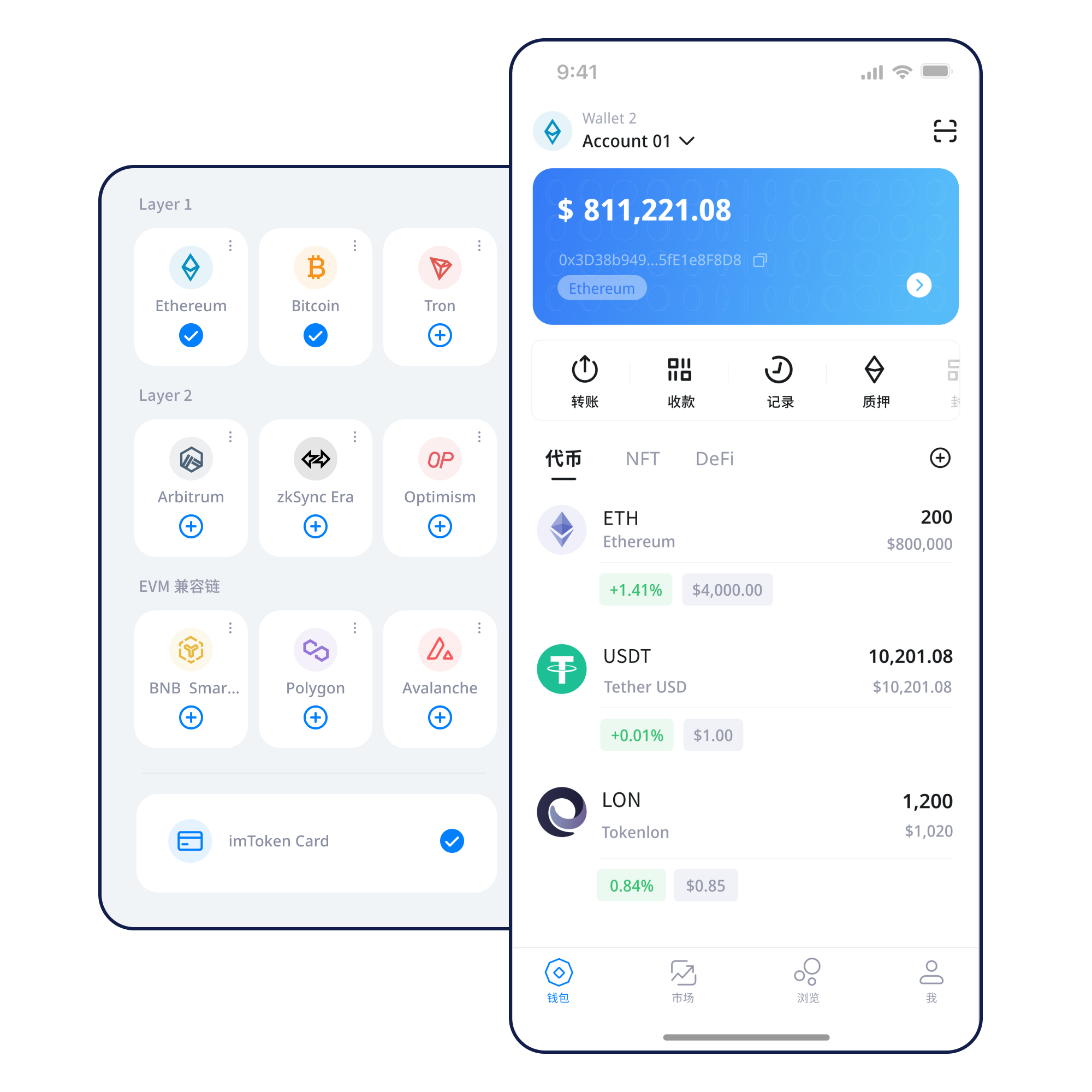
imtoken mobile wallet interface
01Create a Wallet

Understand wallet creation, imports and the boundary of account control.

Open guide →
02Back Up a Wallet

Keep the seed phrase offline and avoid screenshots or casual cloud syncing.

Open guide →
03Receive Assets

Confirm the receiving address, asset network and amount together.

Open guide →
04Send Assets

Review the address, network and gas, then keep the transaction hash.

Open guide →
05Connect to a DApp

Verify the domain before reviewing each signature and approval request.

Open guide →
Wallet Capabilities

Keep assets, networks and action details in one workflow

A wallet is more than an asset list. Network selection, transaction confirmation, DApp connections and permission management all affect the outcome of real tasks.

Multi-chain network concept

Multi-chain Assets

Networks maintain separate state, gas requirements and confirmation processes. Before moving assets, confirm the network, destination and transaction requirements instead of relying on a familiar token name.

Learn about multi-chain networks →

Send & Receive

Check the address and network when receiving. When sending, review the amount, gas and destination again, then use the transaction hash to inspect the on-chain result.

Open the transfer guide →

imtoken Web

Browser connections can be used to access DApps and review account requests. Each signature, transaction and approval still deserves its own decision.

Learn about Web connections →

imtoken App

View assets, manage networks, review transaction history and handle DApp requests while keeping network, address and permission checks close to each important action.

Explore the App →
imtoken App product view
Offline private-key security concept

Wallet Security

Seed phrases and private keys remain under the user's control. imtoken personnel will never ask users to send these secrets.

Open Security Center →
Blockchain Networks

Understand the network before you transact

Public chains, EVM networks, Layer 2 systems and gas are connected concepts. Together they affect addresses, execution costs, confirmations and cross-layer movement.

Multi-chain Networks

The same asset name can appear on multiple networks. Check that the selected network matches the recipient and verify the result with the appropriate block explorer.

Multi-chain network diagram

Public Chain Basics

Nodes validate and record transactions under shared network rules. Block height and confirmation depth help indicate whether a transaction has been accepted by the network.

Public-chain nodes and blocks

EVM Networks

EVM-compatible networks may use similar address formats, but gas assets, contract state and transaction histories remain network-specific.

EVM-compatible network concept

Layer 2

A Layer 2 relates to a base chain but remains a distinct execution environment. Bridging assets can introduce separate steps, waiting periods and confirmations.

Layer 2 and base-chain relationship

Gas & Transaction Confirmations

Gas reflects the cost of network execution. Fees and confirmation speed vary with network conditions, so a single historical number should not be treated as a permanent standard.

Gas and transaction confirmation concept
Usage Path

From getting the wallet to reviewing transactions and approvals

Each stage keeps a distinct verification point so the process remains understandable and independently verifiable.

Get imtoken

Use the common download entry and make sure you are visiting the intended website before continuing.

01

Create or Import a Wallet

Understand the difference between creation and import. Never submit a seed phrase or private key to a webpage.

02

Back Up the Wallet Offline

Record the seed phrase offline, protect it physically and avoid screenshots or casual cloud storage.

03

Select and Verify the Network

Check that the network, address format and destination requirements match before moving assets.

04

Receive or Send Assets

Review the address, network, amount and gas before actively confirming the transaction.

05

Review Transactions and Approvals

Keep the transaction hash and periodically review DApp connections and token approvals that are no longer needed.

06
Web3 & DApps

Review every connection, signature and approval separately

Connecting a wallet does not mean every later request should be accepted. Verify the DApp domain and source first, then inspect account access, signature contents and approval scope.

A wallet connection does not mean every signing request should be approved. Review each signature and approval on its own.
Open the Web3 guide →
  1. Visit the DApp
  2. Confirm the domain
  3. Start the connection
  4. Review the account request
  5. Check the signature or approval
  6. Complete the action
  7. Disconnect sessions you no longer need
Security

Keep seed phrases, private keys and permission boundaries at the center of wallet safety

Seed phrases and private keys should remain under the user's control, and official personnel will never ask for them. In transfer, DApp, airdrop or support scenarios, first decide whether the request genuinely needs the permission being requested. Review the network, address, amount and signature contents before acting. On-chain transactions normally cannot be reversed unilaterally by a wallet, and third-party DApps or smart contracts may carry their own risks, so security depends on consistent checks rather than absolute promises.

Open Security Center →
Seed phrase and private-key offline storage
✓ Back up seed phrases offline✓ Never disclose private keys✓ Verify network and address✓ Inspect signature requests✓ Manage DApp approvals
Academy

What Should You Understand Before Using a Digital Wallet?

Start with the relationship between addresses, seed phrases and private keys, then learn how networks, gas and transaction hashes work. Understanding these concepts before connecting to DApps makes it easier to judge what each later approval actually means.

An address identifies an account for receiving assets. Seed phrases and private keys relate to control. The network determines where an asset and transaction exist. Gas prices execution, while a transaction hash lets you verify the on-chain result. DApp connections, signatures and approvals introduce additional permission decisions.

Start learning →
Scaling

Layer 2 Basics

Learn about base chains, Layer 2 systems, bridges and cross-layer confirmations.

Web3

DApp Approvals

Review approval targets, allowance scope and permissions that are no longer needed.

Security

Wallet Security

Build repeatable habits for seed phrases, private keys, devices and transaction checks.

Glossary

Blockchain Glossary

Quickly understand common terms used in wallet and on-chain workflows.

Ethereum & PoS

Understand staking as a network mechanism, not a fixed-return product

Rewards can change, exits may involve waiting periods, validators can face network penalties, smart contracts carry technical risk and digital-asset prices can move.

Ethereum Staking Basics

Ethereum PoS uses validators in network consensus. Reward sources, validator status, withdrawals and exit behavior can change with protocol rules and network conditions.

Learn about Ethereum staking →

What to Understand Before Participating

Review network penalties, validator status, waiting times, contract risk, third-party service risk and digital-asset price volatility before deciding whether participation fits your situation.

Learn about PoS & validators →
Updates

Product, security and network information

View all updates →
Product Notice
Wallet and network knowledge continues to expand

Guidance is organized around real tasks, network checks and approval review.

View
Security Notice
Never send a seed phrase or private key to anyone

Official personnel will never ask users to provide these secrets.

View
Network Notice
Confirm the destination network before cross-network transfers

A similar-looking address does not prove that two networks are interchangeable.

View
Service Notice
Staking content focuses on mechanisms and risk

No fixed-return, principal-protection or risk-free claims are made.

View
FAQ

Frequently Asked Questions

View full FAQ →

A wallet manages on-chain accounts and signing authority. Asset records live on the relevant blockchain network rather than inside a website.

A seed phrase can usually restore control of a wallet. Keep it offline and never send it to a website, support agent or third party.

Check the asset network, recipient requirements, address format and block-explorer information instead of relying only on a token name.

At minimum, verify the address, network, amount, gas requirement and the actual transaction request.

A connection usually establishes account access only, but later signatures, transactions and approvals must still be reviewed separately.

An approval gives a specific contract permission to use tokens within the granted scope. Excessive allowances or untrusted contracts increase exposure.

No. Rewards can change with network conditions and participation rules, while waiting times, technical risk and market volatility can also matter.

Start with clear network and security checks

Use the common download entry when you are ready. Before every transfer, signature or approval, review the exact request and the network context.

Download imtoken